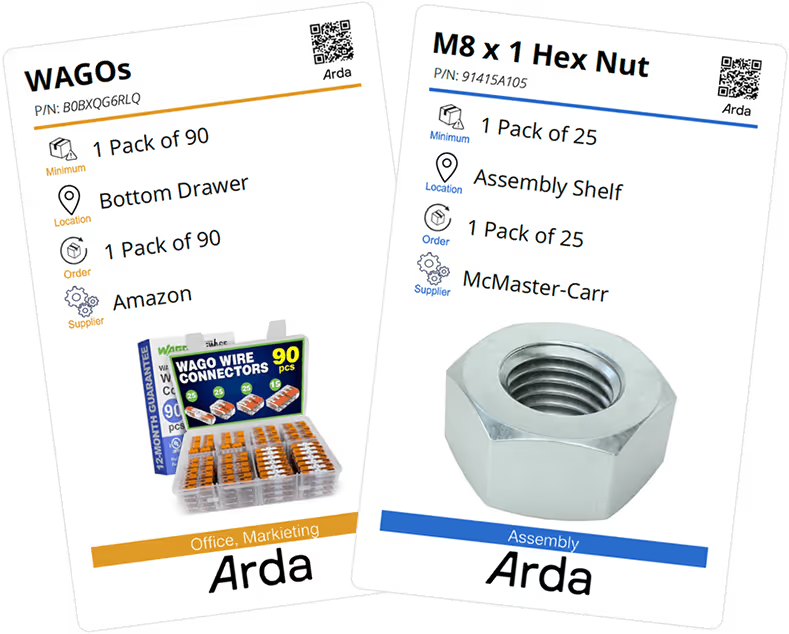
Create Free Kanban Cards in Seconds

No more stockouts, spreadsheets, or guesswork —generate smart Kanban cards that tell you what to order and when.

Kanban Card Generator

Step 1: Where should we get your item information from?
What are you making a card for?
Item Name
Min Quantity
Order Quantity
Location
Supplier
Notes
SKU
Image URL
Product URL


Upload a CSV to create cards in bulk
CSV Text
Instructions
  1. Download the Excel Template
    • Use the provided Excel template to organize your data. Be sure to fill in each row with the correct information under the appropriate column headers.
  2. Save Your File as a CSV
    • Once your data is complete, save the Excel file as a .csv (Comma Separated Values) file.
  3. Open the CSV File in a Text Editor
    1. If you’re using a Mac, open the file with TextEdit.
    2. If you’re on a Windows PC, open it with Notepad.
  4. Copy the Contents
    1. In the text editor, press Ctrl+A (Windows) or Command+A (Mac) to select all the text, then copy it (Ctrl+C or Command+C).
  5. Paste into the Input Field Above
    • Scroll to the field below this message and paste the copied text. This will allow the system to process your data and generate Kanban cards from it.
Where should we send your cards?
Name
Company
Email

let's fix your inventory chaos — in 15 minutes

“We doubled output and cut inventory by 80% without changing how our team works.”

Luke Farny,
Rossmonster
Book a live demo and see how Arda replaces spreadsheets and whiteboards with smart, scannable reorder cards and our operations software built for the shop floor.
What You’ll Learn
How Arda replaces manual tracking with simple QR reorder cards
How to set up in minutes with our cards and easy to use platform
See how companies like yours 2X revenue in 9 months
How to roll it out across your parts list, fast
Oops! Something went wrong while submitting the form.